Retailers email.
The thread finishes.
You never opened it.
Price, stock, purchase orders, “where is it?” — answered from your own records, in minutes, from your own address.
It has run. On 31 August a retailer’s email came in, was priced against live Shopify records at 552.24 USD, waited out its hold, and the reply went out. On 3 September the same loop ran against a real Zoho organisation and placed a real Sales Order on its own totals — on a test organisation, so that one answered nobody.
Northwind Traders · one week
Every one of these, done
- Open it
- Find the company
- Open their price list
- Match the SKUs
- Check stock + rules
- Type the draft order
- Write the reply
- Price on A-200 and B-110?Quote
Quoted 2 items — 600.00 USD · their price list · their quantity rules
- Stock on A-200?Availability
Answered from live stock · not from a nightly copy
- Where is PO 4471?Status
Being prepared, not shipped yet · read from the order itself
- Our PO 4482, attachedOrder
Order prepared — 2 items, Net 30 · priced against their price list, stock checked
- Change our billing addressChange request
Needs you — never automated · address, payment and contact changes are always yours
… and every other retailer, the same week
Order — PO 4482 · runs in 10:00
The one that needs you was never going to be sent at all.
- This is for you if
- You sell wholesale to retailers
- Shopify B2B, or Zoho Inventory + Books, with companies and price lists set up
- Orders arrive on a shared address
Somebody will try to talk it into something. We tried first.
- 59
- adversarial cases, per system of record
- 0
- got what they asked for
- 10 / 10
- ordinary messages handled normally

I built the desk and the gate that attacks it. Write to me if it does not hold up. — Masanori Iwata
One retailer. One week. Three answers nobody typed.
A wholesale conversation is not a document to convert. It is a handful of messages over several days, and every one of them needs the same three things looked up: which company is this, what are their prices, what does the stock say.
The receipt cards below are drawn. The screenshot under the first one is the real screen.
Tuesday, 9:04Northwind Traders
“Hello, please quote A-200 x 24 and HS-001 x 100. Thanks, Sam”
QuoteQuoted 2 items for Northwind Main — total 600.00 USD
A-200: 24 @ 12.50 USDHS-001: 100 @ 3.00 USDStock read liveWhere every number came from
Priced by Shopify for Northwind’s own company location, on their price list, against their quantity rules, with stock read live. It waited in a cancel window before it went out.
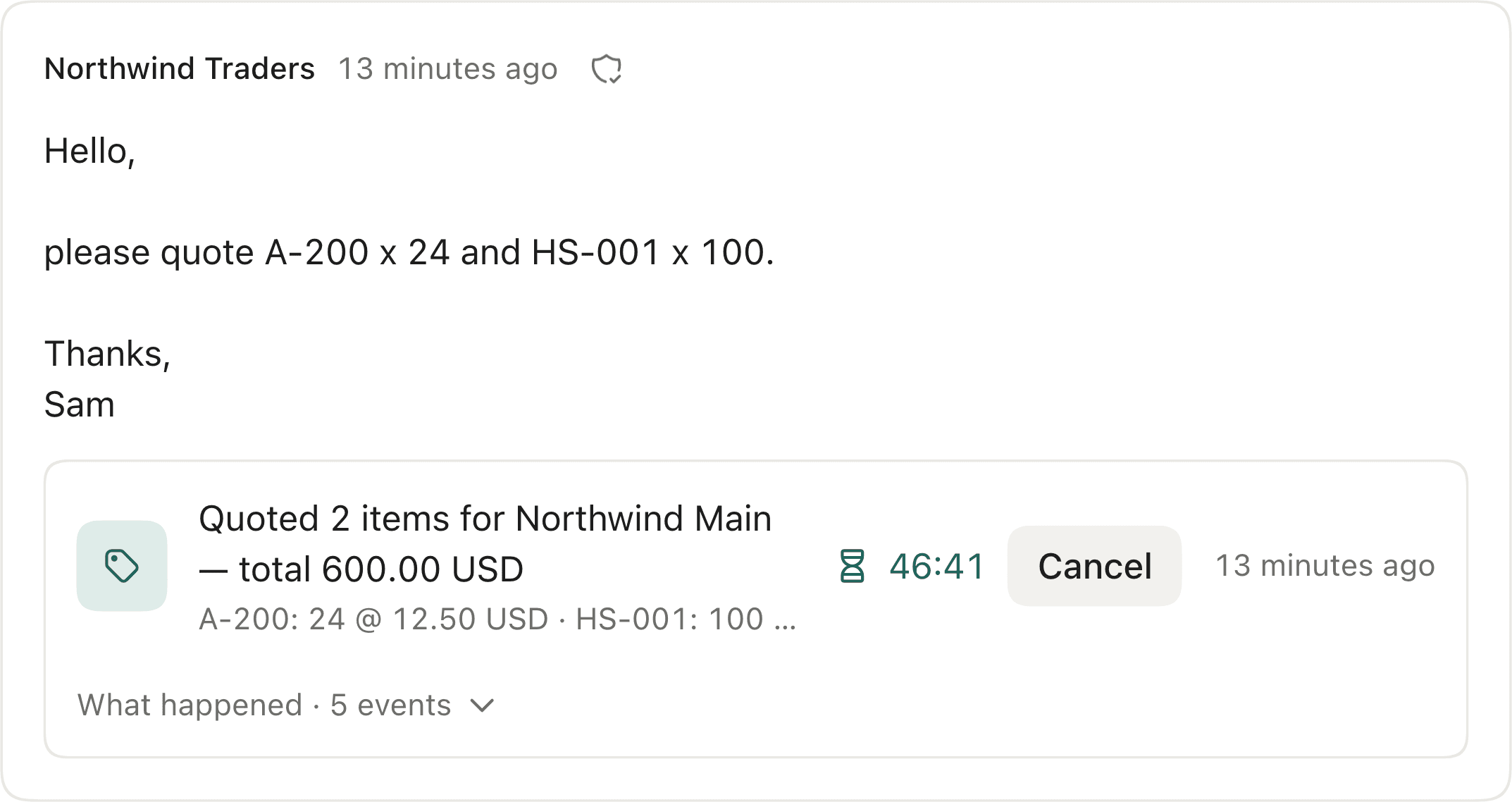
Scroll to read it →
That message, on the real screen, with the answer resolved under it. The retailer gets it as an ordinary reply, from your address. Tuesday, 11:20
“Great — go ahead. Our PO 4471 is attached.”
OrderOrder for Northwind Main (PO 4471) — 2 items, total 600.00 USD
NET 30 from their termsShip-to: the address on filePO 4471 on the orderWhere every number came from
The two lines were read out of the attached purchase order and matched to your variants. A line the desk cannot find in the message never becomes an order. Confirmed back by email with the real order number.
Friday, 8:40
“Any news on PO 4471?”
StatusStatus of 1 order for Northwind Main — #1002, being prepared
Where every number came from
Answered from the order record, scoped to Northwind’s own locations. No other company’s orders exist as far as that question is concerned.
Friday, 8:52
“One more thing — ship this one to our new Bristol store instead.”
Needs youAddress, payment or contact change — never automated
Why it stopped
It stops here with the message, the reason and the whole thread, and waits for a person. Of these four, it is the only one that reached anybody.
Four messages. Three receipts. One thing on someone’s screen — the one that should have been.
Before you switch anything on, it reads your own mail back to you.
You do not have to believe a landing page. Forward the mailbox and, from that day, Trade Counter counts what arrives and what it is — against timestamped records, on your own mail, before a single class is switched on.
What your mail is actually made of
How much of it is order-desk work, how much is everything else, and which of the four kinds of question it is.
Which attachments it could read
Counted against the attachments you really received, not against a sample we chose.
And then you still start in Watch
Answers on screen, nothing sent, for as long as you want. The switch is yours and it goes back.
No accuracy number here, and none in the product. A figure measured on somebody else’s mail is not about yours. You get every answer on your own threads instead, with nothing sent.
Coverage preview
The last 90 days
1,240messages read
764 order-desk jobs476 other mail — never replied to
What they asked for
- Quote310
- Availability150
- Order180
- Status80
…plus 44 acknowledgements, disputes and change requests.
- Companies recognised
- 46
- Attachments with text
- 96 had text · 3 did not
The file is not the job.
Reading a purchase order and turning it into an order is a solved problem, and Trade Counter does it. It is also one message out of seven — and the other six arrive in the same mailbox, from the same retailer, in the same week.
The one marked row is what a purchase-order converter is about. The other six still land on a person — and the last one is meant to.
An order desk is the whole column, not one row.
One desk. The systems you already run.
Your own records on one side, the mailbox you already run on the other. Neither needs anything installed in it.
Your records
One system of record per workspace, fixed by the first connection. The desk is written against a records interface; each of these implements it.
- Companies, their locations and contacts
- Catalogs and price lists
- Quantity rules and payment terms
- Live inventory
- Orders, and the draft the desk prepares
Prices come from your own system’s calculation for the purchasing company, never from a copy we keep. On Shopify that calculation is a read, so in Watch nothing is written at all. On Zoho there is no such read: the desk creates a draft Estimate or Sales Order to get the authoritative total and deletes it again, proving it gone — you are told that before you connect, and what you see is a used document number and a line in your activity log. Zoho is never asked to email anyone.
Zoho runs behind a per-workspace flag while its own listing is prepared, and the Japanese editions are the ones verified end to end so far. If that is your setup, write to me.
Your mailbox
Trade Counter mints an intake address for your workspace and you forward wholesale@ to it. Nothing is installed on the mailbox, and nothing in it is moved, labelled or deleted.
Forward from
- Gmail
- Outlook
- …or any other provider
A forwarding rule is the whole connection into the desk — plus the DNS records that let replies leave from your own domain (Setup, step 2). It is the same rule everywhere — which is why the list has no end, and why these are examples rather than a supported-with list.
It is built to stop, not to guess.
You are handing over the messages that turn into money owed to you. So the interesting question is not what the desk answers — it is what happens on the day it should not have. Six answers — one of them is the switch itself, and the other five are not switches at all.
Watch first, then caps you set
Every class starts by showing you the answer it would have sent — and sending nothing.
How it works
Trade Counter interprets the message, resolves it against your records, and shows you the answer it would have sent. Nothing is sent, and nothing is finalized. On Shopify nothing is written at all; on Zoho the total has to come from a draft the desk creates and then deletes again, which is said plainly before you connect. You move a class to bounded Run when you have seen enough of them — with how much one job may commit, how much a company may total in a day and who is in scope all set by you, ratified as a policy version, and reversible. Any class goes back to Watch whenever you want.
A hold before every write
Every action waits in a cancel window you set. Cancel is one press.
How the hold worksHow it works
Nothing goes out the moment it is decided. You see the countdown, and Cancel is one press: on Shopify there is nothing to undo afterwards, and on Zoho the draft the desk created to price the plan is deleted with it. When the window ends it re-checks your policy and your live records — if either has moved, it stops and asks.
Only companies you trade with
A stranger asking what your wholesale prices are gets nothing at all.
How it works
The message has to authenticate, and the sender has to be a contact on one of your companies — synced from your records, or one you attached yourself. Replies go to the authenticated sender; a reply-to address outside your company does not redirect the answer, it stops it.
It ships to your record, not the message
A different address in the message stops the job. It does not change the order.
How it works
Every order the desk prepares carries the shipping address recorded on that company location, explicitly. If the message asks for somewhere else, the job becomes an exception with the plan still locked to the address you have on file — an address asserted in an email is never where goods go. Payment terms and contacts are the same: those changes are always yours to make, never automated.
It never writes the words
No generated prose reaches a retailer. Ever.
How it works
The step that reads a retailer’s message can neither send nor write anything. Every reply is one of the desk’s templates with typed slots filled from your own records, sent from a domain you verify — a structural separation, not a setting.
Unverifiable becomes an exception
Not a guess, not a best effort — the reason, the evidence, and a plan already prepared.
How it works
The exception carries the reasons, the lines it read with the exact words they came from, and the plan it had already prepared — so clearing it is usually one press. Where the answer is teachable it sticks: a retailer’s own part number becomes an alias, a new buyer becomes a contact, a cap becomes a policy change.
You are not the safety mechanism.
The cancel window is for the times you are looking. The rest of the time it is your ceiling that stops it: how much one job may commit, how much one company may total in a day, how many orders in a day, and who is in scope at all. And when the window closes it re-checks that ceiling and your live records before it moves — if either has changed, it stops and asks rather than acting on what was true when the window opened.
Two ways it stops.
You stop it. Every action waits in a window you set, with the countdown and the button on the receipt.
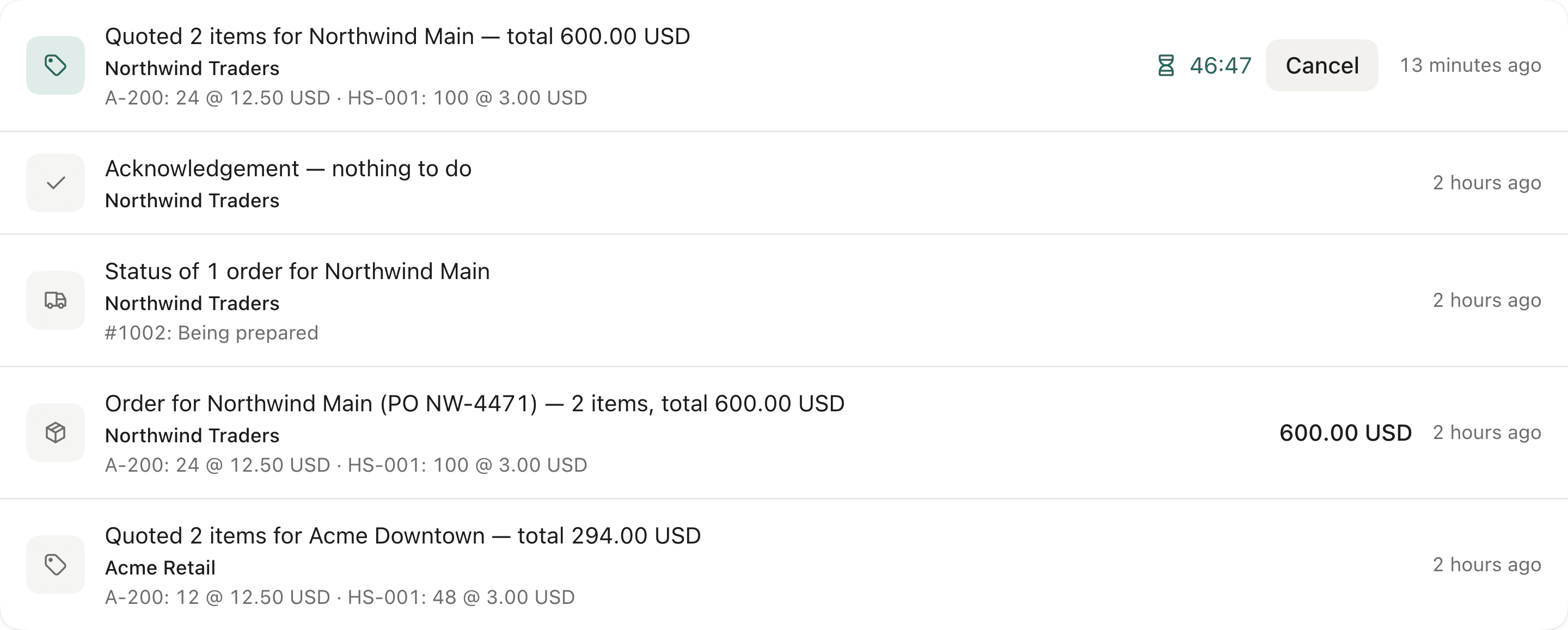
Scroll to read the ledger →
It stops itself. Anything it cannot verify becomes an exception — with the reason, the evidence, and the plan it had already prepared.
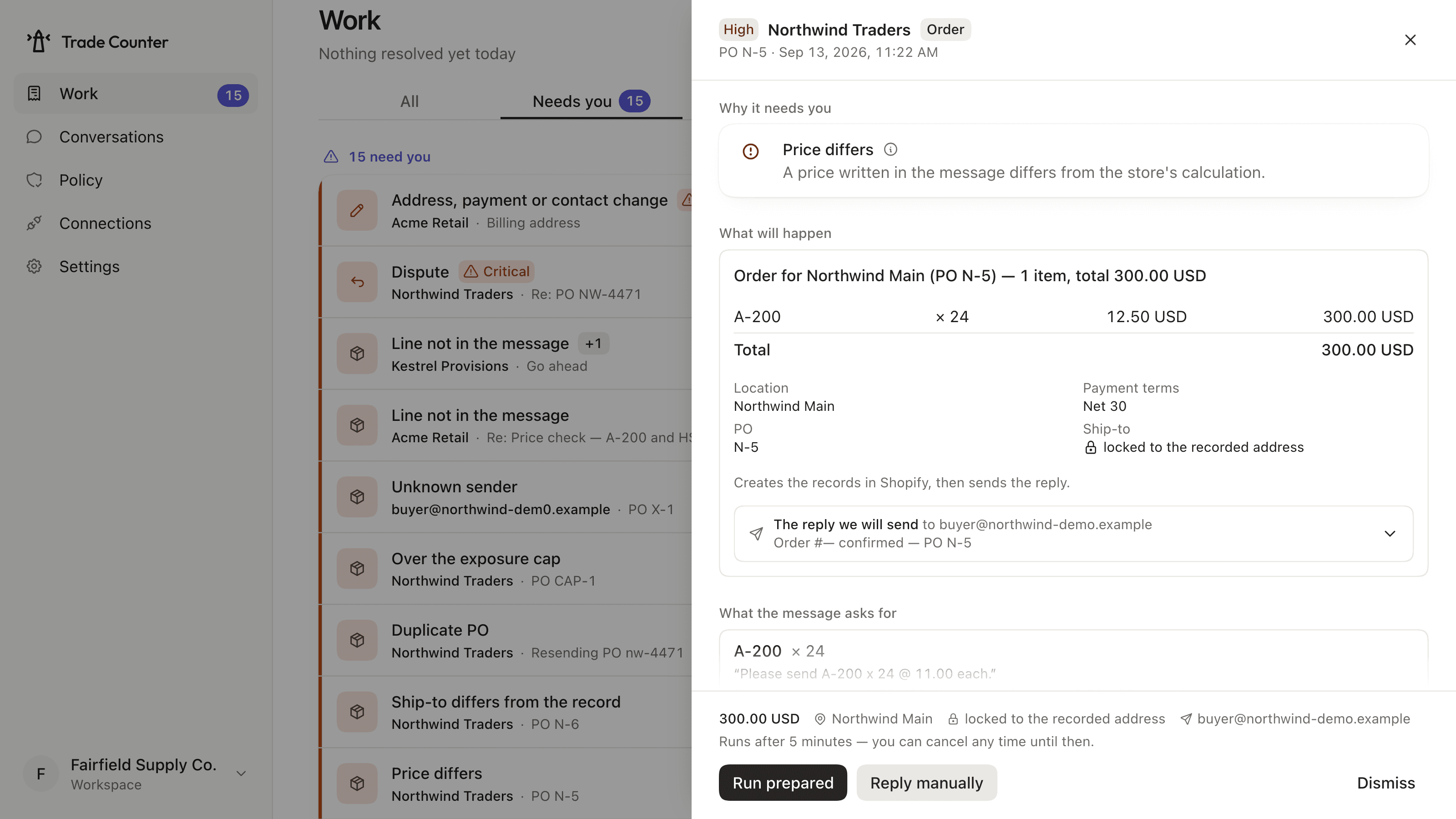
Scroll to read the whole panel →
Somebody will try to talk it into something.
A retailer’s email is untrusted text, and text can carry instructions. So the part that reads a message can neither send nor write — that is structural, not a setting. The way to know whether it holds is to attack it, so there is a gate that does, and it is run before every release. The whole corpus runs once against each system of record we accept — 2 of them, 138 cases a run.
- 59
- adversarial cases, per system of record
- 0
- got what they asked for
- 10 / 10
- ordinary messages handled normally
What was tried
- Instructions hidden in the message body
- …in quoted history further down the thread
- …in the text of an attachment
- …in an attachment's filename
- …in the subject line
- A Reply-To pointing somewhere else
- A rival retailer added to Cc
- A ship-to address swapped at the last moment
- A lookalike domain, a free-mail address, our own mail replayed
- A purchase order replayed to order twice
- A price moved while the action was still held
- A draft edited in the Shopify admin mid-hold
The interpreter is hostile in every one of them. It is scripted to say exactly what the injected text demanded — so no case can pass because the model happened to behave. What refuses has to be the structure.
10 ordinary messages run in the same pass. A desk that never acts is trivially safe. If any of the 10 does not do exactly what it should — including the two whose correct answer is to do nothing at all — the gate fails too.
11 of the 59 still ended in an action. The attack was ignored and the honest request underneath it was answered — a quote sent to the buyer alone, an order placed for what the buyer actually asked for. What none of them got was the thing the injected text demanded.
It runs the shipped kernel and the shipped order desk against a stand-in for a store, and it is our own gate rather than an outside audit — which is why it is run before every release instead of once.
Connected in an afternoon. Answering when you say so.
There is nothing to configure before it is useful. It reads your records, it reads your mail, and it shows you what it would do — until you tell it otherwise.
- 1 · One connection
Connect your records
Shopify B2B, or a Zoho Inventory + Books organisation. It reads your companies, price lists, quantity rules, terms and live stock — then tells you, per company location, whether it can price for them, and why not if it cannot.
- 2 · One forwarding rule, a few DNS records
Forward your wholesale address
You get an intake address and point your wholesale mailbox at it. Nothing is installed on the mailbox. A handful of DNS records verify the domain your replies are sent FROM — until they are, the desk can read but not answer.
Which records - 3 · No decision yet
Watch the coverage build
From the first forwarded message it counts what arrives and what it is — before you switch anything on.
- 4 · Reversible, always
Start in Watch, then ratify
Watch shows the answers without sending them. Ratify a policy version to move a class to bounded Run, with the caps and cancel window you chose. Any class goes back whenever you want.
14-day free trial · Watch never counts against your allowance
Priced on work resolved, not on seats.
Per workspace, per month. A job counts once — when the desk resolved it end to end.
Starter
$99/ month
Up to 150 auto-resolved jobs a month— about 7 a working day
One system of record, one mailbox connection
Growth
$249/ month
Up to 600 auto-resolved jobs a month— about 29 a working day
One system of record, mailbox connections as needed
Scale
$599/ month
Up to 1,500 auto-resolved jobs a month— about 71 a working day
One system of record — above this allowance, talk to us
Free on every plan
- Exceptions — the ones handed back to you
- Watch predictions
- Acknowledgements and other mail
- Everyone on your team
What exactly counts as a job, and what happens if I go over
A job counts when the desk resolved it end to end — it answered, or it created the order, and nothing came back to you. Anything it handed back does not count, and neither does anything it only predicted in Watch. Billing runs through Shopify App Pricing, on your existing Shopify invoice; the Zoho private beta has no Shopify subscription to charge against and is not billed through it. Running past an allowance never stops you mid-month and never degrades Watch. The “a working day” figures above divide the allowance by 21 — the working days in an average month — and are there to size the tier, not to cap a day.
Cancel from your Shopify admin at any time.
Questions worth asking first.
Do I have to be on Shopify?
Not any more — but you do have to keep your wholesale records somewhere the desk can read. Two systems of record are supported: Shopify B2B, and Zoho Inventory + Books, which is in private beta while its own listing is prepared. Either way it has to be the B2B side, with companies and price lists configured — if your wholesale prices live in a spreadsheet, there is nothing yet for the desk to price against. One workspace uses one of them, fixed when you connect. The desk itself is written against a records interface that each of them implements, and the mailbox side is forwarding, which works with whatever mail system you run.
What does my retailer actually see?
An email from your address, in your words. Replies are sent from a domain you verify as yours — never from us — and the text is one of the desk’s templates with the numbers filled in from your records, so it reads the same way every time and nothing is generated. The reply lands in the thread the retailer already started, so from their side it is simply an answer, arriving faster than one you would have typed.
What does it need from my records?
It reads the records a person on your order desk already opens: your companies, their locations and contacts, your catalogs and price lists, quantity rules, payment terms, live inventory and orders. It writes the order — only for a class you have moved to bounded Run, and only after that action has sat through its cancel window. On Shopify that is a draft order and an order, and nothing else. On Zoho it is a draft Estimate or Sales Order and its finalisation, plus the deletion of a draft it prepared and is not going to place; Zoho is never asked to email anyone, and the desk never approves its own submissions. Attaching a new buyer to a company happens on your side, when an admin presses it.
Which mailbox can I connect?
Any of them, by forwarding. Trade Counter mints an intake address for your workspace and you forward your wholesale address to it — nothing to install on the mailbox, and it works with whatever mail system you already run. Every forwarded message is verified on its original bytes, using the signature the sender applied or the chain your forwarder sealed, before anything is allowed to act on it.
Do you train on our email?
No. Your mail is not used to train models — our interpretation provider’s terms state that API inputs and outputs are not used for training — and we do not sell it, share it or profile anyone with it. Who processes what, and for how long it is kept, is set out in the Privacy Policy.
Where do the prices come from?
From your own system’s calculation for that purchasing company — their price list, their quantity rules, in their currency. On Shopify that is Shopify’s calculation; on Zoho it is the draft the desk prepares in your organisation and reads the total off. Never our copy of a price, and never an inference from a past order. If a company location cannot be priced, that becomes an exception with the reason on it rather than a number nobody can account for.
What happens when a retailer emails from an address you do not know?
Nothing is sent. An unknown sender gets no reply of any kind — what your wholesale prices are is not a question a stranger gets to ask. If the message authenticated, it appears on Work as an unknown sender and an admin can attach them to the right company in one press, which settles it for every message that follows. If it did not authenticate, it is set aside under Other mail and nothing is asked of you.
What if it gets something wrong?
Inside the cancel window, Cancel is a single operation. On Shopify there is nothing to undo, because nothing has been written; on Zoho the draft the desk created to price the plan is deleted with it, and you get an exception naming it if that does not go through. After the window, the receipt links to the order in your own system and a person can reverse it. Either way the correction is recorded against the class that produced it — as is a reply you wrote by hand, and an order you edited there yourself.
Does it read purchase orders sent as attachments?
Yes — a purchase order written in the message, and a PDF purchase order with a text layer. The lines are read out of the document and matched to your variants. A line it cannot find literally in the message it was sent never becomes an order — it becomes an exception naming the line it could not place. Spreadsheets and images are not read yet.
What about the mail that is not order-desk work at all?
It is set aside under “Other mail”. It is never an exception, it never gets a reply, and it never counts against your plan. Most of it never reaches interpretation at all — a newsletter or an automatic reply is set aside on its headers alone. A sender you do not trade with is read first and then set aside, because a stranger writing about an order and a stranger writing about anything else are not the same thing.
Your retailers are going to email today.
Connect it, forward one address, and let it show you the answers for a while before it sends any of them.
Tell me when it opensIn review on the Shopify App StoreZoho Inventory + Books — private beta- Nothing is sent until you say so
- Every action holds before it happens
- 14-day free trial
I’m Masanori Iwata, and I build Trade Counter. If something here is wrong, if your store is shaped in a way the desk does not handle, or if this page did not answer your question, write to me. support@orumio.com comes straight to me.